
In short
- A repeater is a list of rows with the same fields: a team, prices, a FAQ.
- You make it in the builder in minutes, and the editor gets Add row, drag and remove.
- In the theme it is a plain foreach over ugly_rows(), with nothing hidden in a loop.
- The repeater is free. Flexible content, for blocks of different kinds, is Pro.
A repeater field is a list of the same small set of fields: team members, prices, steps, questions and answers. WordPress does not have one built in. This is how to make a repeater field in WordPress with a free plugin, put it on any page, and print it in your theme with a plain foreach. No meta box to write, no JavaScript, no hidden loop.
What a repeater field is
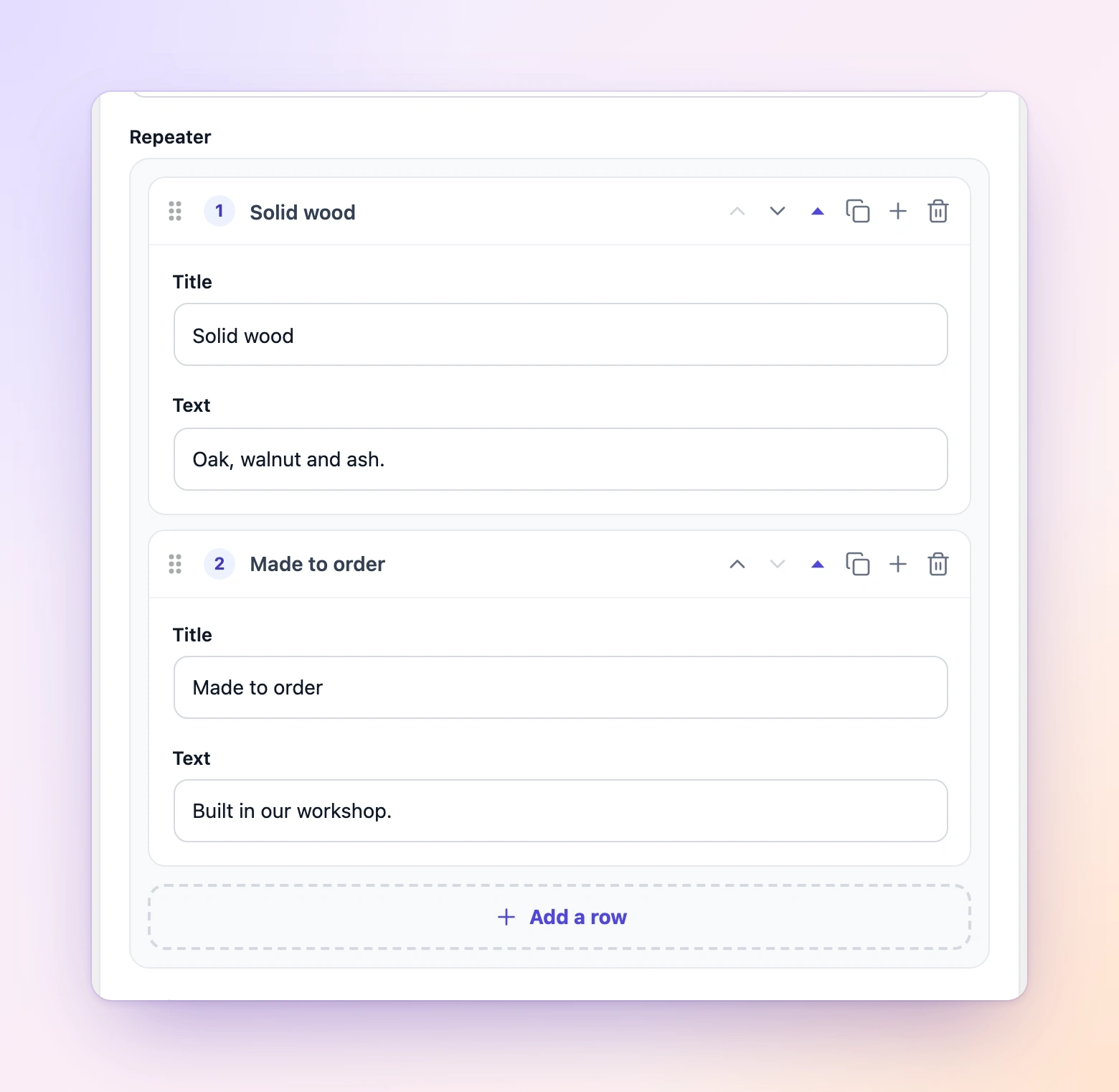
Most custom fields hold one value: a headline, a price, a picture. A repeater holds a list of rows, and every row has the same fields. The editor presses Add row as many times as needed, drags the rows into order and removes the ones they do not want.
You reach for one whenever the number of items is not fixed:
- A team page: a name, a role and a photo for each person.
- A price list: a plan, a price and what is included.
- A FAQ: a question and an answer, as many as the page needs.
- A slider or a set of steps: an image, a title and a line of text for each slide.
Why WordPress does not give you one
WordPress stores custom fields as post meta: one key and one value. A list of rows has no place in that, so you have to build it. Doing it by hand means a meta box, some JavaScript so the editor can add, remove and reorder rows, a nonce, sanitising every value on the way in and escaping it on the way out. It can be done, and plenty of developers have done it once per project.
Make a repeater field in five steps
This uses UglyFields, which is free, and it takes a few minutes. We will build a team list.
1. Install the plugin and make a group
Install and activate UglyFields. Open UglyFields → Field groups → New group and choose Fields for pages and posts. Name the group Team. In Location, say where it shows up: a page, a post or your own content type.
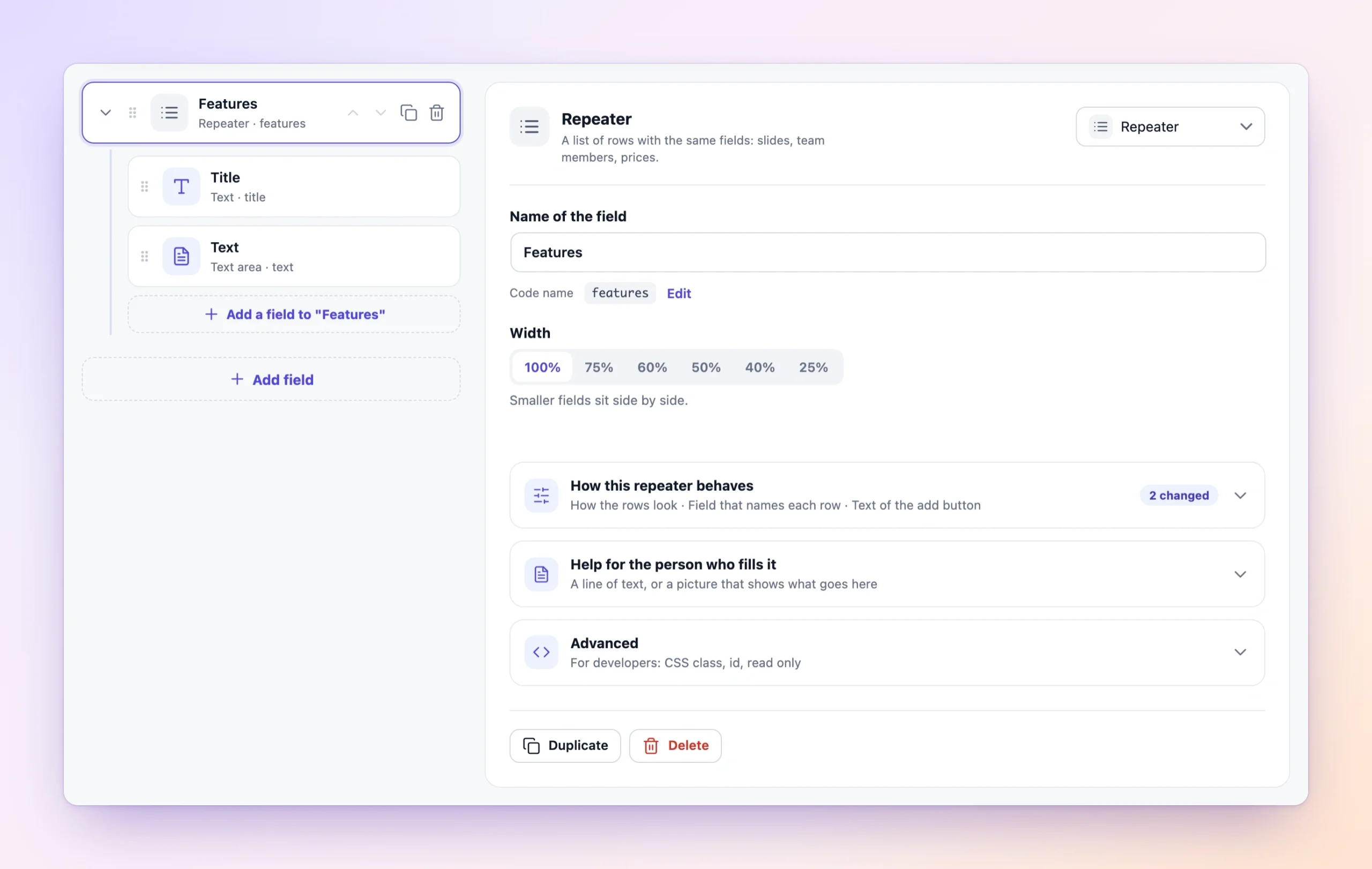
2. Add a Repeater field
Press Add field. A window opens with a search box and the kinds of field. Type list or find Repeater among the popular ones. It is added to the end of the group, ready to name. Call it Team.
3. Add the fields of one row
Inside the repeater, press Add a field for each thing a row has. For a team: Name (Text), Role (Text) and Photo (Image). Every row will have exactly these three.
4. Choose how it behaves
The repeater has a handful of settings, in plain words:
| Setting | What it does |
|---|---|
| How the rows look | Cards put the fields one under the other. Compact puts them side by side, which suits rows with a few short fields. |
| Field that names each row | Its text is shown on the row, so you can tell the rows apart when they are folded. Pick Name. |
| Text of the add button | Say Add a person instead of Add row. |
| Fewest rows needed and Most rows allowed | The editor starts with the minimum and cannot go past the maximum. Zero means no limit. |
5. Fill it in
Edit a page that has the group. The repeater shows as a list with Add row at the bottom. Each row can be dragged, folded, duplicated and removed.
Print the rows in your theme
This is the part that matters for the code you keep. A repeater is a list, so you loop over it with foreach:
<?php foreach ( ugly_rows( 'team' ) as $member ) : ?>
	<article>
		<h3><?php $member->show( 'name' ); ?></h3>
		<p><?php $member->show( 'role' ); ?></p>
	</article>
<?php endforeach; ?>
Three things to notice:
show()prints the value already escaped for its type, so you do not wrap it inesc_html().ugly_rows()always gives a list. If the page has no rows, or the field is not there at all, the list is empty and the loop simply does not run. Noif, no warning.- There is no
have_rows()and no hidden pointer. A repeater is a list, and a list is looped withforeach.
To print something only when it is filled in, ask the row:
<?php if ( $member->has( 'photo' ) ) : ?>
	<?php echo wp_get_attachment_image( $member->get( 'photo' ), 'thumbnail' ); ?>
<?php endif; ?>
Pass a row to a template part
In the old style, the current row lives in a hidden state that only exists inside the loop, so a template part that reads it has to be called from inside that loop and nowhere else. Here a row is just a variable, so you hand it over:
foreach ( ugly_rows( 'team' ) as $member ) {
	get_template_part( 'template-parts/team-member', null, array( 'member' => $member ) );
}
And in template-parts/team-member.php:
<?php $member = $args['member']; ?>
<article>
	<h3><?php $member->show( 'name' ); ?></h3>
</article>
If you are coming from ACF, this is the translation:
| In ACF | In UglyFields |
|---|---|
while ( have_rows( 'team' ) ) : the_row(); | foreach ( ugly_rows( 'team' ) as $member ) : |
the_sub_field( 'name' ); | $member->show( 'name' ); |
get_sub_field( 'name' ); | $member->get( 'name' ); |
Moving a whole site is covered in Thinking about leaving ACF?.
A repeater inside another
A row can hold its own repeater. A menu has categories, and each category has dishes:
<?php foreach ( ugly_rows( 'menu' ) as $category ) : ?>
	<h2><?php $category->show( 'title' ); ?></h2>

	<?php foreach ( $category->rows( 'dishes' ) as $dish ) : ?>
		<?php $dish->show( 'name' ); ?>
	<?php endforeach; ?>
<?php endforeach; ?>
The limit is one level: a repeater can hold another repeater, but not a third inside those two. If you feel you need a third, a group field is the way to organize it.
Add a row from code
Sometimes the rows come from somewhere else: an import, a form, a script. Read the rows, add yours, and write the whole list back:
$post_id = 42;

$rows   = array_map(
	static fn ( $row ) => $row->toArray(),
	ugly_rows( 'team', $post_id )
);
$rows[] = array(
	'name' => 'Marta',
	'role' => 'Waiter',
);

ugly_update( 'team', $rows, $post_id );
A row cannot be changed in place ($row['x'] = 1 does nothing), which keeps reading and writing clearly apart. ugly_update() is how you write.
Repeater or flexible content?
A repeater is a list of rows that are all the same. If a page needs blocks of different kinds in any order (a hero, then text, then a gallery), that is flexible content, where each row knows its kind with layout(). The repeater is part of the free plugin. Flexible content is Pro.
Habits that keep a repeater pleasant
- Name each row. Pick a field that names it, so folded rows read as a list and not as “Row 1, Row 2”.
- Keep rows small. A repeater is for repeating things. A row with twenty fields wants to be a content type of its own.
- Set a maximum when there is one. A slider with six slides should not let someone add sixty.
- Print with
foreach, not by index. The editor reorders rows; position is not an identity. - Hand the row to a template part when the markup grows. Your loop stays short.
A complete example: a team grid
Putting it together, here is a whole template part: a list with a photo when there is one, and a friendly line when the page has no team yet.
<?php
$team = ugly_rows( 'team' );
?>
<?php if ( $team ) : ?>
	<ul class="team">
		<?php foreach ( $team as $member ) : ?>
			<li class="team__person">
				<?php if ( $member->has( 'photo' ) ) : ?>
					<?php echo wp_get_attachment_image( $member->get( 'photo' ), 'medium' ); ?>
				<?php endif; ?>
				<h3><?php $member->show( 'name' ); ?></h3>
				<p><?php $member->show( 'role' ); ?></p>
			</li>
		<?php endforeach; ?>
	</ul>
<?php else : ?>
	<p>The team page is coming soon.</p>
<?php endif; ?>
The list is truthy only when it has rows, so the empty case takes one else. Nothing here needs a counter, a pointer or a reset at the end of the loop.
A repeater, or a content type of its own?
Both hold “many of the same thing”, so it is worth choosing on purpose. Use a repeater when the items only make sense on one page and the editor never needs to open one by itself: the steps of a process, the logos in a row, the questions of a FAQ.
Use a content type when each item deserves its own address, its own page, a place in search or an archive: team members with their own profile, products, events. You can still list them on another page, and the content type guide shows how to make one. A simple rule: if you would ever want to link to a single item, make it a post, not a row.
To pick the right kind of field for everything else on the page, read every field type in one minute. To find posts by what is inside their fields, see stop writing meta_query.
Questions people ask
Does WordPress have a repeater field?
Not in core. WordPress stores one value per custom field key, so a list of rows needs a meta box you write yourself or a plugin that provides it.
Is the repeater field free in UglyFields?
Yes. The repeater is part of the free plugin. Flexible content, which lets the editor add blocks of different kinds, is Pro.
How do I loop over a repeater in my theme?
Use foreach over ugly_rows('team') and print each value with $row->show('name'). The list is empty, never an error, when there are no rows.
Can a repeater have a repeater inside it?
Yes, one level: a repeater can hold another repeater, but not a third. Use a group field to organize anything deeper.
How do I limit the number of rows?
Set Fewest rows needed and Most rows allowed in the settings of the repeater. Zero means no limit.
Can I add rows from code?
Yes. Read the rows with ugly_rows(), turn each into an array with toArray(), add your own and write the list back with ugly_update().
Ready to try it?
Download the free plugin, build your first group in a few minutes and keep it in your theme. No time limit, no sign-up.